Inline Assembler(Written with C/C++ language and Assembler language)

I will start with the background of Inline Assembler as it is a way for C/C++ language and Assembler language to co-exist in the same program.

Background:

Inline Assembler Language:

Allows the use of Assembler language within a C language program to prevent certain values from changing during the compiling stage of the program. This will allow the programmer to interact with the memory using the asm code and set the memory location with specific code. This is useful when using the same values over and over again without having to recreate the values. It is like using a function or header file for C programming language.

Syntax:

asm(...);

or

__asm__(...); //This uses double underscores

You can force the compiler not to move the register values of specified registers using the constraint “volatile”.

Ex.1 Volatile Constraint asm:

asm volatile (…);
or
__asm__ __volatile__ (…);

The line of assembly code is placed in between the parenthesis.

The code can have:
1) Assembler Template(Mandatory)
2) Output Operands(Optional)
3) Input Operands(Optional)
4) Clobbers(Optional)

Assembler Template

The assembler template will be the code written in Assembler language.

For example(Aarch64 system):

"mov %1, %0; inc %0"

For example(X86_64 system):

"mov %r8, %%rax; inc %%rax"

Note: the X86_64 system must use a double percent sign to indicate a percent sign. (This is similar to regular expressions in coding where double of a certain character means an escape character.)

Inline Assembler language has a syntax/ format of code.

The following are allowed:

asm("mov %1, %0\ninc%0);
__asm__("mov %1,%0\ninc %0);
__asm__ ("mov %1,%0\n" "inc %0");
__asm__ ("mov %1,%0\n\t"
"inc $0");

The following are not allowed:

asm("mov %1,%0
inc %0");     //There is not ending double quotes on the first line
__asm__("mov %1,%\n","inc %0");     //Cannot place a comma in between the strings

Output and Input Operands

The output operands are the second parameter in Inline Assembler. The input operands are the third parameter in Inline Assembler

Ex.1 Where the output and input operands are:

asm("...";
: "=r" //Output Operand
: "r" //Input Operand
:
);

Constraints

Assembler language is using register values instead of the traditional variables. The output or input operand is not always needed.

There are however some constraints, such as:
"r" - any general purpose register is permitted

"0-9" - same name register should be used as operand. (For example: register "1" is used so the operand should also be "1". This is to avoid confusion of where the register and operand are.)

"i" - an immediate integer value is permitted

"F" - an immediate floating-point value is permitted

Other constraints are platform-specific like SIMD or floating-point registers so refer to a reference manual. Here is one for GNU Assembler: http://gcc.gnu.org/onlinedocs/gcc-4.8.2/gcc/Extended-Asm.html

Output Operands

There are certain constraints for output registers. Here are some example:

"=" (output-only register) previous contents are replaced with output value only. (Does not preclude use as an input register, meaning it is not permanently set/ lock the register for output only.)

"+" (input and output register) used as both input and output register to input into the asm code and output from the asm code.

"&" (early clobber register) This register can be overwritten before input is processed. It is best not to use this register as an input register.

"%" (commutable/interchangeable) Besides platform specific constraints, this percent sign with a matching operand and the following operand are both interchangeable for optimization.

Here are some examples written in C language and Inline Assembler language:

Ex.1 Set values to two registers(x86_64):

int x=10,y;
__asm__ (mov %1,%0"
: "=r"(y) //output is moved to "y" and the corresponding assembly register is register "0". 
: "r"(x) //input of "x" is placed in a general purpose register. Assembly Register "1" is used here.
:
);

Ex.2 Make the second operand as a read/write register(x86_64):

int x=10, y;
__asm__ ("mov %1, %0"
: "+r"(y) // + makes the register a read/write register
: "0"(x) // Sets Output the same as Assembly Register 0 (%0).
:
);

Ex.3 Naming/ assigning alias to registers(x86_64):

int x=10, y;
__asm__ ("mov %[in],%[out]"
: [out]"=r"(y) //This Assembly Register has an alias/name of "out".
: [in]"r"(x) //This Assembly Register has an alias/name of "in".
:
);

Specific Register Width(Aarch64 system):

A 32-bit width register uses contraint/ modifier of “w”. For example: C language Register 0 (%0) of Assembler language Register (x28) needs to be converted into a 32-bit wide register. Access a 32-bit wide register by using “%w0”.

Constraining Operands

Constraining operands to a specific register is useful when it is used as an input for a function or syscall. This will avoid the need to rewrite the operand into another register or use more system resources to handle a function.

Ex.1 Register a name/alias to a register (In C language):

register int *foo asm ("a5");

Ex.2 Register a specific register to an operand (Aarch64 system, In C language and Assembler Language):

int x=10;
register int y asm(“r15”);

asm("mov %1,%0; inc r15;"
: "=r"(y)
: "r"(x) // Assembler Register r15
:
);
Note:  The C language already assigns “y” to Assembler Register “r15”.
register int y asm("r15");

The Assembler instruction then performs the “mov” command and then the “inc” command to Assembler Register “r15”. Constraiting the register in C language will stop the Assembler language from incrementing before moving the operands. (Sometimes the compiler will optimize for incrementing before moving the operands)

i386 Register Constraint

On i386 systems, registers may be selected using the “a” “b” “c” or “d” names instead of the “r” register constraint.

Cobbler(Overwrites registers)

This is the fourth parameter that is optional but is used when registers or memory regions are being overwritten.

Ex.1 Clobber in x86_64:

asm("..."
: "=r"(out)
: "r"(in)
: "rax", "rbx", "rsi" // values in Assembler Register rax, rbx, rsi will be clobbered
);

Memory

The constraint “memory” should be added as a string to the clobber list when an asm code alters the memory. This forces the compiler to ignore/ mistrust the memory values before the asm code is executed. This is a way to make certain that a value in memory before the asm code is still the same value after the asm code is executed. It is recommended to use the volatile constraint with the memory clobber constraint.


Testing/ Experimenting:

Test 1:

The actual testing will now begin. The testing is done on an Aarch64 Fedora Linux OS system with a Cortex-A57 octa-core CPU.

SQDMULH Instruction

“Signed Saturating Doubling Multiply return High Half”. Basically multiplying two 16-bit signed values will result in a 32-bit value. In a fixed-point 32-bit result, there are 16-bits high values and 16-bits low values. The instruction then takes only the high half of the 32-bits discarding the lower 16-bits.

There are a couple of files that will be used. vol.h, vol_simd.c, Makefile. These files were provided to me by Chris Tyler (Chris Tyler), a Seneca college professor.

vol.h:

#define SAMPLES 500000

vol_simd.c:

// vol_simd.c :: volume scaling in C using AArch64 SIMD
// Chris Tyler 2017.11.29-2018.02.20

#include <stdlib.h>
#include <stdio.h>
#include <stdint.h>
#include "vol.h"

int main() {

int16_t* in; // input array
int16_t* limit; // end of input array
int16_t* out; // output array

// these variables will be used in our assembler code, so we're going
// to hand-allocate which register they are placed in
// Q: what is an alternate approach?
register int16_t* in_cursor asm("r20"); // input cursor
register int16_t* out_cursor asm("r21"); // output cursor
register int16_t vol_int asm("r22"); // volume as int16_t

int x; // array interator
int ttl; // array total

in=(int16_t*) calloc(SAMPLES, sizeof(int16_t));
out=(int16_t*) calloc(SAMPLES, sizeof(int16_t));

srand(-1);
printf("Generating sample data.\n");
for (x = 0; x < SAMPLES; x++) {
in[x] = (rand()%65536)-32768;
}

// --------------------------------------------------------------------

in_cursor = in;
out_cursor = out;
limit = in + SAMPLES ;

// set vol_int to fixed-point representation of 0.75
// Q: should we use 32767 or 32768 in next line? why?
vol_int = (int16_t) (0.75 * 32767.0);

printf("Scaling samples.\n");
// Q: what does it mean to "duplicate" values in the next line?
__asm__ ("dup v1.8h,%w0"::"r"(vol_int)); // duplicate vol_int into v1.8h

while ( in_cursor < limit ) {
__asm__ (
"ldr q0, [%[in]],#16 \n\t"
// load eight samples into q0 (v0.8h)
// from in_cursor, and post-increment
// in_cursor by 16 bytes

"sqdmulh v0.8h, v0.8h, v1.8h \n\t"
// multiply each lane in v0 by v1*2
// saturate results
// store upper 16 bits of results into v0

"str q0, [%[out]],#16 \n\t"
// store eight samples to out_cursor
// post-increment out_cursor by 16 bytes

// Q: what happens if we remove the following
// two lines? Why?
: [in]"+r"(in_cursor)
: "0"(in_cursor),[out]"r"(out_cursor)
);
}

// --------------------------------------------------------------------

printf("Summing samples.\n");
for (x = 0; x < SAMPLES; x++) {
ttl=(ttl+out[x])%1000;
}

// Q: are the results usable? are they correct?
printf("Result: %d\n", ttl);

return 0;

}

Makefile:

BINARIES = vol_simd
CCOPTS = -g -O3

all:    ${BINARIES}

vol_simd:       vol_simd.c vol.h
                gcc ${CCOPTS} vol_simd.c -o vol_simd

test:           vol_simd
                bash -c "time ./vol_simd"

gdb:    vol_simd
        gdb vol_simd

clean:
        rm ${BINARIES} || true


These are the testing requirements for the sampling program:

1) Copy, build and verify the operations of the program 

2) Test the performance results 

3) Change the sampling size(in vol.h) to produce a measurable runtime 

4) Adjust the code to have comparable results. (number of samples, 1 array vs 2 arrays, etc.) 

5) Answer the questions in the source code (in vol_simd.c) 1) Copy, Build, Verify Operations I start with by building the program:

The following is the command  to build the program:

gcc -g -O3 vol_simd.c -o vol_simd

Similarly, I could run this command since the Makefile is configured with the vol_simd settings:

make vol_simd

Next I ran this command to run the program:

./vol_simd

The result:

Generating sample data.
Scaling samples.
Summing samples.
Result: -574

Next I ran this command to time the command’s duration/runtime:

time ./vol_simd

Result:

Generating sample data.
Scaling samples.
Summing samples.
Result: -574

real: 0.028s
user: 0.019s
sys: 0.009s

The file size: 74752 bits
500000 sample size
  • Real is the combination of user time and sys time together/ combined. This will be the total time that the command ran on the system.
  • User is the time it takes to execute the command on the user’s side.
  • Sys is the system time it takes to call/execute the command.

Test 1 Comparison:

I could do a comparison with the other sampling program given to me by professor Chris Tyler that I have tested before:

vol1.c
#include "stdlib.h"
#include "stdio.h"
#include "stdint.h"
#include "vol.h"

// Function to scale a sound sample using a volume_factor
// in the range of 0.00 to 1.00.
static inline int16_t scale_sample(int16_t sample, float volume_factor) {
return (int16_t) (volume_factor * (float) sample);
}

int main() {

// Allocate memory for large in and out arrays
int16_t* in;
int16_t* out;
in = (int16_t*) calloc(SAMPLES, sizeof(int16_t));
out = (int16_t*) calloc(SAMPLES, sizeof(int16_t));

int x;
int ttl;

// Seed the pseudo-random number generator
srand(-1);

// Fill the array with random data
for (x = 0; x < SAMPLES; x++) {
in[x] = (rand()%65536)-32768;
}

// ######################################
// This is the interesting part!
// Scale the volume of all of the samples
for (x = 0; x < SAMPLES; x++) {
out[x] = scale_sample(in[x], 0.75);
}
// ######################################

// Sum up the data
for (x = 0; x < SAMPLES; x++) {
ttl = (ttl+out[x])%1000;
}

// Print the sum
printf("Result: %d\n", ttl);

return 0;

}

vol.c and vol_simd.c programs have a huge difference in time.

The file size is gotten from the Linux command:

ls -l

vol.c had these results:

500000 sample size
Result: -86
Size of file: 70808 bits
real: 0.036s
user: 0.027s
sys: 0.009s

vol.c results had a slightly slower time by a couple of milliseconds compared to the vol_simd.c results. vol_simd.c had a larger file size than vol1.c.

(74752 bits compared to 70808 bits)

This shows the trade-off of faster time needs more file space. Less file space will cause the program to run slower.

Test 2:

What will happen if I changed the sample size in vol.h to 5000000?

I then performed these steps to still have an original copy of the program in case I break or cause a problem with the program. There were the steps:

  • I copied vol.c and named it vol2.c
  • I copied vol.h and renamed it to vol2.h
  • I edited the vol2.h to have 5000000 instead of 500000
  • I edited the Makefile to compile with the new files: vol2.c and vol2.h

Using these commands:

cp vol_simd.c vol_simd2.c
cp vol.h vol2.h

Change the sample size to 5000000 using this command:

vi vol2.h
Press the "i" key to insert a new '0'
Press the escape key to get out of the Insert mode of Vim Editor
Type ':x' to save and exit out of Vim Editor

Change this:

#define SAMPLES 500000

Into this:

#define SAMPLES 5000000

Now I will edit the Makefile using this command:

vi Makefile
(Repeat the process like in vol2.h file to insert and save the changes)

It will look like this(The text in red):

BINARIES = vol_simd
CCOPTS = -g -O3

all: ${BINARIES}

vol_simd: vol_simd.c vol.h
gcc ${CCOPTS} vol_simd.c -o vol_simd

vol_simd2: vol_simd2.c vol2.h
gcc ${CCOPTS} vol_simd2.c -o vol_simd2

test: vol_simd
bash -c "time ./vol_simd"

gdb: vol_simd
gdb vol_simd

clean:
rm ${BINARIES} || true

I compiled the file and timed it using this command:

time make vol_simd2

The compile time was:

real: 0.119s
user: 0.082s
sys: 0.035s
File Size: 74760 bits

I then ran the program with the time command using:

time ./vol_simd2

The Results:

Generating sample data.
Scaling samples.
Summing samples.
Result: -574

real: 0.028s
user: 0.028s
sys: 0.000s

I ran the program a second time to see if there was a difference to the result:

real: 0.027s
user: 0.018s
sys: 0.009s

Comment:

This did not change much as the file size only increased by 8 bits.

Test 3:

I thought that there must be an impact if I increased the sample size even further.

I repeated the same steps to copy and edit the new files: vol_simd3.c vol_simd3.h using the Linux copy command ‘cp’ and the Vim Editor ‘vi’ command.

I changed the sample size from 5000000 to 5000000000.

I compiled the program again.

These were the results:

File Size: 74760 bits
Compile time:
real: 0.122s
user: 0.062s
sys: 0.056s

Then running the program with the time command and these were the results:

Generating sample data.
Scaling samples.
Summing samples.
Result: -574

real: 0.027s
user: 0.018s
sys: 0.009s

Comment:

It seems to have cut off after a certain threshold and did not start to take more system resources or crash the system.

Test 4:

I thought what would happen if I reduced the sample size to see if there was an impact to the system since increasing the sample size did not change the results.

I changed the sampling size to 5000 and re-compiled the program vol_simd4.c and vol_simd4.h.

The results:

File Size: 74760 bits
Result: -574
Compile time:
real: 0.116s
user: 0.082s
sys: 0.034s
Run time:
real: 0.027s
user: 0.018s
sys 0.009s

Comment:

Changing the sample size did not change anything as the compile time and run time were relatively the same as the original vol_simd.c program. The file size also remained the same at 74760 bits.

Test 5:

I tested what would happen when I changed the value of 32767 to 32768 in this line of code:

vol_int = (int16_t) (0.75 * 32767.0);

The Results:

File size: 74760 bits
Compile time:
real: 0.116s
user: 0.091s
sys: 0.025s
Generating sample data.
Scaling samples.
Summing samples.
Result: -66

real: 0.027s
user: 0.027s
sys: 0.000

I ran it a second time to check if there were any changes:

Generating sample data.
Scaling samples.
Summing samples.
Result: -66

real: 0.027s
user: 0.027s
sys: 0.000s

Comment:

Not much changed. The file size remains the same. The compile time and run time were relatively the same. Only the result changed from -574 to -66.

Questions left in the file vol_simd.c by Professor Chris Tyler

Q: What is an alternate approach?
A: The alternate is to allow the compiler to automatically
choose which registers to use and allow the optimization to
run based on the algorithms designed by the developers of the GNU compiler.

Q: Should we use 32767 or 32768 in next line? why?
A: We should use 32767 since we have already defined a maximum limit for the samples.
The samples are starting from the minimum value of an int16_t or a 16-bit signed
integer to the maximum value of the 16-bit signed integer.

Q: What does it mean to “duplicate” values in the next line?

Code:
__asm__ (“dup v1.8h,%w0”::”r”(vol_int)); // duplicate vol_int into v1.8h

Reference:
(dup)
Microsoft Visual Studio 2017 duplicate definition

(vector registers)
GNU vector registers

A: A duplicate is stored into a vector which will act as an
array of equal size. The value to duplicate is “%w0”
which is the 32-bit register “0”. The values to duplicate
will be sent into the “dup v1.8h” command.
The “8h” in the code is eight copies of the values to duplicate and
will store the value into the “%w0” register.

Q: What happens if we remove the following two lines? Why?
: [in]”+r”(in_cursor)
: “0”(in_cursor),[out]”r”(out_cursor)

A: This line:
: [in]”+r”(in_cursor)

This line will use the input operand as
both input and
output. Removing this will cause the while loop
to not move from the sampled position.

The line:
: “0”(in_cursor),[out]”r”(out_cursor)

The “0” indicates the in_cursor is the same
registry as register “0”(Input is using the same register as Output). The code [out]”r”(out_cursor) will be the name/ alias to the general
register “r”. Removing this line will allow/make the
compiler choose any random general
purpose register and store that data into it.

Removing these lines of code will defeat the purpose of the inline assembler code.
Inline Assembler code is for hard-coding/setting the registers with a
given value. Also, this will ensure that the registers on the system will not be randomly used by the GNU compilers. For example: Erasing data for optimization purposes.

Q: Are the results usable? Are they correct?
printf(“Result: %d\n”, ttl);

A: The answer is yes since the result did not change like the vol.c sampling program done before and changing the sample size did not change the file size since this program is well optimized.

Comment:

The program is well optimized when the file size shows little change and using SIMD and Vector registers allow a more compact area to store values into registers.

Final Task: Checking a package written by the Open-Source Community for any inline assembler code

I will be searching the libmad package. This packages is a MPEG decoder package designed for decoding video images.
I should first check if there is any installed packages

yum search [package_name]

Also, I did not know which Fedora version I was using on the school’s machine so the command allowed me to see which version of Fedora Linux I was using.

Version: Fedora 28(Aarch64)

Note: You can use this command to install the package:
 sudo -c 'yum install libmad'

Instead, I will download a new source file package for testing
from the Fedora website for packages

https://apps.fedoraproject.org/packages/libmad

I will also be getting the Latest Released Version. The reason is to have the most stable version without major bugs/ problems from the developers.

libmad-0.15.1b-26.fc28.src.rpm

Site:
https://koji.fedoraproject.org/koji/fileinfo?rpmID=15431115&filename=libmad-0.15.1b.tar.gz

I will create a new directory to store the test.

mkdir -p test

The command will make a parent director called ‘test’.

I will change to that directory using this command:

cd test

I will use the following command to get a copy of the source code from the website link.

wget https://kojipkgs.fedoraproject.org//packages/libmad/0.15.1b/26.fc28/src/libmad-0.15.1b-26.fc28.src.rpm
Note: This package is in the rpm format and I will need to get the .tar.gz file from inside the rpm file to get the source code.

I then did a Google search on how to extract rpm file.

Site:
http://www.e7z.org/open-rpm.htm

The site told me to use an extraction tool called rpm2cpio

Note: If not installed, install using this command:
yum install rpm2cpio

Following the instructions for Extract files on Linux using rmp2cpio by replacing the pkgname with the actual name of the package and replacing package.rpm with my corresponding package (libmad-0.15.1b.tar.gz) from the template below:

mkdir pkgname
cd pkgname
rpm2cpio ../package.rpm | cpio -idmv

Now I can extract the source code in the .src file:

tar xvf pkgname
Note: Remember to replace the pkgname with the corresponding package that you are using.

I will now try to find specific files(Assembler files) in Linux using the following command:

find . -name "*.[sS]"

The only file found was imdct_l_arm.S

The difference of .s or .S type file

.S vs .s:
.S is a file sent to the C compiler and .s is compiled using the assembler directory

I then checked how many codes where actually in the imdct_l_arm.S file using this command:

grep "r[0-9]" imdct_l_arm.S | wc -l

What the command does is check any lines with the specific pattern “r” followed by any number. This indicates a register since this is an Aarch64 system assembler Code for registers. II were use a different search method on a x86_64 system. Something like this:

grep "r[a,b,c,d,x,0-9]" [filename] | wc -l
Note: filename is the filename corresponding to the x86_64 system.

There was 541 lines of assembler code handling registers in the dedicated Assembler file.

I will now check how many codes in the package that actually contain in-line assembler code.

I searched using this command:

egrep "__asm__" -R
Note: This did not return anything. Meaning there isn’t an individual file for containing the assembler code.

I tried a different pattern to check if there were any inline assembler code using this command:

egrep "asm" -R

The result shows that there are a lot of in-line assembler code in some of the files of the package.

Now to count how many code there are. Inline assembler code are separated with a newline and with the phrase “asm”. I then used this command to count each newline with a matching “asm” pattern:

egrep "asm" -R | wc -l
83

There were 83 files found. These can be found in:

  • mad.h(26 lines of asm code)
  • TODO (4 lines of asm code)
  • fixed.h(26 lines of asm code)
  • msvc++/mad.h (25 lines of asm code)

The registers for the assembler code are designed for an aarch64 type architecture.

Example:

asm ("addl %2,%0\n\t" \

The number of systems that can run this code is only limited to aarch64 systems but this also allows better optimization for the specific system with the loss of portability of the code to other systems.

I did a search for the other systems that this package can support from this website:

Site:
https://rpmfind.net/linux/rpm2html/search.php?query=libmad

This package can support:
aarch64
armhfp
x86_64
i386
ppc64
ppc64le
s390x

A total of 7 different architecture systems

Final Comment:

The down side of optimization on a specific architecture is the number of different constraint that can be set in the assembler language. Another down side is whether the architecture supports SIMD(Single Instruction, Multiple Data – Basically one instruction performs multiple commands) and Vector registers(Special registers aside from the architecture specific registers). I can see that programs can offer optimization (Faster compile time, faster run-time/ execution time) or offer portability (Different systems and architecture) and sometimes both. Both optimization and portability are time-consuming and costly for each architecture and system.
Algorithm Selection/ Sampling using C language

I will begin with a C language program given to me by Chris Tyler (https://wiki.cdot.senecacollege.ca/wiki/User:Chris_Tyler)

The file will be named “vol.c”

#include "stdlib.h"
#include "stdio.h"
#include "stdint.h"
#include "vol.h"

// Function to scale a sound sample using a volume_factor
// in the range of 0.00 to 1.00.
static inline int16_t scale_sample(int16_t sample, float volume_factor) {
        return (int16_t) (volume_factor * (float) sample);
}

int main() {

        // Allocate memory for large in and out arrays
        int16_t*        in;
        int16_t*        out;
        in = (int16_t*) calloc(SAMPLES, sizeof(int16_t));
        out = (int16_t*) calloc(SAMPLES, sizeof(int16_t));

        int             x;
        int             ttl;

        // Seed the pseudo-random number generator
        srand(-1);

        // Fill the array with random data
        for (x = 0; x < SAMPLES; x++) {
                in[x] = (rand()%65536)-32768;
        }

        // ######################################
        // This is the interesting part!
        // Scale the volume of all of the samples
        for (x = 0; x < SAMPLES; x++) {
                out[x] = scale_sample(in[x], 0.75);
        }
        // ######################################

        // Sum up the data
        for (x = 0; x < SAMPLES; x++) {
                ttl = (ttl+out[x])%1000;
        }

        // Print the sum
        printf("Result: %d\n", ttl);

        return 0;

}

This program will use a file called “vol.h”

#define SAMPLES 500000

The file “vol.h” only contains the sample size that the program will be sampling. 500000 will be the default sample size.

I will be using a Makefile program to compile the programs, called “Makefile”

# list all binaries in this next line
BINARIES = vol1
CCOPTS = -g -O3

all: ${BINARIES}

vol0: vol0.c vol0.h
gcc ${CCOPTS} vol0.c -o vol0

vol1: vol1.c vol.h
gcc ${CCOPTS} vol1.c -o vol1

vol2: vol2.c vol2.h
gcc ${CCOPTS} vol2.c -o vol2

vol3: vol3.c vol3.h
gcc ${COOPTS} vol3.c -o vol3

vol4: vol4.c vol4.h
gcc ${COOPTS} vol4.c -o vol4

# target to test all binaries
gdb1: vol1
gdb vol1

clean:
rm ${BINARIES} || true

Background:

Sampling is used to change an analog data into a digital data. The analog data can be voice or sound. Standards were made to ensure the minimum and maximum amount of sound is heard. I went and did a search on the Internet to find the default sampling rate and got this webpage from the first result on www.google.ca (https://manual.audacityteam.org/man/sample_rates.html) The website describes audio samples as bandwidth and it is measured in Hertz(Hz). The website also explains the Nyquist Frequency that has a lower sampling limit of 20000Hz and an upper sampling limit of 22050Hz. (This is only half of the requirement as the average human has two ears) The sampling will have to be double the original sampling value to get the final sampling value. A lower limit of 40000Hz and an upper or maximum limit of 44100Hz.  (More commonly known as 44.1KHz of sampling)

The Sampling will have to also consider the loudness or scaling of the sample. 0 being silence and 1 being maximum loudness.

The sampling tests will be performed on an Aarch64 Linux OS, Cortex-A57 octa-core CPU system.

The programs will be compiled using the glibc program free to install on any Linux OS system.

Tests

Now to start with the tests.

I would use a command:

make vol1

This is because the glibc program was installed on the system and the Makefile has the required code to compile the C language program into an new file called ¨vol1¨

Alternatively, I can track the time it takes to compile the program using the built-in timer that Linux has.

time make vol1

The time command returns three different values in Linux:

Real, User and Sys.

Real time is the time the CPU takes to perform a task. User time is the time to run a task. Sys time is the time it takes the system to perform or call the task and execute it. Sys time will change depending on the amount of users actively performing tasks.

First Test

A sampling size of 500000 set in the vol.h file and I complied it.

Using this command:

time make vol1

or

time gcc -g -O3 vol1.c -o vol1

Result: -86

Real time: 0.115s

User time: 0.103s

Sys time: 0.013s

The real time is CPU time used. The compiling time takes 115 milliseconds to run on the CPU. The user time is the time used for running the code as a process. The compiler takes 103 milliseconds to compile. The Sys time is the time it took to request the system to perform the command. This program waits 13 milliseconds before it can use the CPU and System resources. The result does not change from -86.  (The results will be brief from now on.)

Now to run the program using:

./vol1

or to time the command:

time ./vol1
The first time to sampling:

Real time: 0.036s
User time: 0.035s

Sys time: 0.000s

Second time to sampling:

Real time: 0.036s

User time: 0.027s

Sys time: 0.009s

Third time to sampling:

Real time: 0.036s

User time: 0.036s

Sys time: 0.000s

File size: 70808 bits
500000 sample size estimated average time:

Real time: 0.036s

User time: 0.035s

Sys time: 0.000s

Comment:

Notice that during the second time sampling had a change in Sys time as another user was probably also using the system’s resources. The Real and User times were relatively the same in those sampling tests.

Second Test

This test will be changing the size of sampling to 5000000.

I copied both vol1.c and vol.h to vol2.c and vol2.h.

I then changed the sampling size in the vol.h file from 500000 to 5000000.

I used these commands:

cp vol1.c vol2.c
cp vol.h vol2.h
vi vol2.h

I compiled the program using the Makefile and ran the program as mentioned during the First Test.

Compiling time:

Real time: 0.122s

User time: 0.091s

Sys time: 0.027s

The first time sampling:

Result: 244

Real time: 0.258s

User time: 0.238

Sys time: 0.020s

The second time sampling:

Real time: 0.260s

User time: 0.230s

Sys time: 0.030s

The third time sampling:

Real time: 0.258s

User time: 0.238s

Sys time: 0.020s

The fourth time sampling:

Real time: 0.260s

User time: 0.250s

Sys time: 0.010s

File Size: 74520 bits
5000000 sample size estimated average time:

Real time: 0.258s

User time: 0.238s

Sys time: 0.020s

Comment:

Doing four tests with the changed sampling size causes the system to take more time each varying about 10 milliseconds. Currently this increases the time spent to compile and run the sampling program compared to the First Test. The result still remains 244 through each sampling test.

Third Test

I will now change the sampling size to 50000.

Repeating the steps from the Second Test to make a copy of the sampling program from vol1.c named vol0.c and change the sampling size in the new copy of vol0.h to 50000.

I compiled and ran the program like before.

Result: -838
Compile time:

Real time: 0.119s

User time: 0.075s

Sys time: 0.044s

The first time sampling:

Real time: 0.005s

User time: 0.004s

Sys time: 0.000s

The second time sampling:

Real time: 0.028s

User time: 0.027s

Sys time: 0.001s

Comment:

Changing the sampling size to a lower amount does lower the time to compile and run the sampling program. The result remains -838 through each sampling test.

Fourth Test

This test will change the sampling program to use a lookup table instead of a multiplicative factor.

Repeat the steps to copy and rename the files: vol1.c and vol.h file to vol4.c and vol4.h.

Three new lines of code will be added:

int16_t lookuptable[65536];
lookuptable[x] = (int16_t)(x * 0.75);
out[x] = lookuptable[(u_int16_t)in[x]];
  1. int16_t lookuptable[65536]; code will be creating an array table for values to be compared to when a given input is received from sampling.
  2. lookuptable[x] = (int16_t)(x * 0.75); code will take each value in the lookup table and multiply the input with 0.75 scale/ loudness.
  3. out[x] = lookuptable[(u_int16_t)in[x]; will output the matching output from the given input of sampling.

The code for vol4.c will look like this:

#include "stdlib.h"
#include "stdio.h"
#include "stdint.h"
#include "vol.h"

// Function to scale a sound sample using a volume_factor
// in the range of 0.00 to 1.00.
static inline int16_t scale_sample(int16_t sample, float volume_factor) {
return (int16_t) (volume_factor * (float) sample);
}

int main() {

// Allocate memory for large in and out arrays
int16_t* in;
int16_t* out;
//Add a lookup table array with 65536 possible values of 16-bits
int16_t lookuptable[65536];
in = (int16_t*) calloc(SAMPLES, sizeof(int16_t));
out = (int16_t*) calloc(SAMPLES, sizeof(int16_t));

int x;
int ttl;

// Seed the pseudo-random number generator
srand(-1);

// Fill the array with random data
for (x = 0; x < SAMPLES; x++) {
in[x] = (rand()%65536)-32768;
}

//Lookup table for scaled samples
for(int x = 0; x < 65536; x++){
//Each value in the lookup table is muliplied by a factor of 0.75 
lookuptable[x] = (int16_t)(x * 0.75);
}

// ######################################
// This is the interesting part!
// Scale the volume of all of the samples
for (x = 9; x < SAMPLES; x++) {
//out[x] = scale_sample(in[x], 0.75);
//Make the output lookup a scaled value for the given input
out[x] = lookuptable[(u_int16_t)in[x]];
}
// ######################################

// Sum up the data
for (x = 0; x < SAMPLES; x++) {
ttl = (ttl+out[x])%1000;
}

// Print the sum
printf("Result: %d\n", ttl);

return 0;

}

I will change the sampling size to the value of 5000000 in the vol5.h file like in the other tests.

I will compile and run the program as before using the make and time commands.

Result: 907
Compile time:

Real time: 0.094s

User time: 0.062s

Sys time: 0.032s

The first time sampling:

Real time: 0.329s

User time: 0.299s

Sys time: 0.030s

The second time sampling:

Real time: 0.326s

User time: 0.306s

Sys time: 0.020s

The third time sampling:

Real time: 0.375s

User time: 0.355s

Sys time: 0.020s

The fourth time sampling:

Real time: 0.326s

User time: 0.306s

Sys time: 0.020s

Comment:

Like any other sampling tests the results remain 907

I made a mistake in the vol4.c program. In this section:

// ######################################
// This is the interesting part!
// Scale the volume of all of the samples
for (x = 9; x < SAMPLES; x++) {
//out[x] = scale_sample(in[x], 0.75);
//Make the output lookup a scaled value for the given input
out[x] = lookuptable[(u_int16_t)in[x]];
}
// ######################################

The x = 9 should have been  x = 0.

Now I will redo the Fourth Test with the changed  value.

Recompiling changes the results a bit.

Result: 760
The file size: 70766 bits
The compile time:

Real time: 0.099s

User time: 0.080s

Sys time: 0.015s

The first time sampling:

Real time: 0.326s

User time: 0.316s

Sys time: 0.010s

The second time sampling:

Real time: 0.327s

User time: 0.307s

Sys time: 0.020s

The third time sampling:

Real time: 0.329s

User time: 0.328s

Sys time: 0.000s

The fourth time sampling:

Real time: 0.332s

User time: 0.312s

Sys time: 0.020s

Comment:

The new value did not change the slow time of compiling and running the sampling program. This is probably because the lookup table is being constantly check for a new sample value slowing the CPU and system. The result still remains 760 for each sampling test.

The Fifth Test

This test will change the volume factor to a fixed-point value.

I will start by copying and changing the vol1.c and vol.h file again to vol5.c and vol5.h.

I will change the sampling value in vol5.h to 5000000 like the previous tests.

I will add new code to change the volume factor using this code:

int16_t volume_factor = 0.75 * 256;

The vol5.c file should look like this:

#include "stdlib.h"
#include "stdio.h"
#include "stdint.h"
#include "vol.h"

// Function to scale a sound sample using a volume_factor
// in the range of 0.00 to 1.00.
static inline int16_t scale_sample(int16_t sample, float volume_factor) {
return (int16_t) (volume_factor * (float) sample);
}

int main() {

// Allocate memory for large in and out arrays
int16_t* in;
int16_t* out;
in = (int16_t*) calloc(SAMPLES, sizeof(int16_t));
out = (int16_t*) calloc(SAMPLES, sizeof(int16_t));
//Add a fixed-point integer multiply by a binary number
int16_t volume_factor = 0.75 * 256;

int x;
int ttl;

// Seed the pseudo-random number generator
srand(-1);

// Fill the array with random data
for (x = 0; x < SAMPLES; x++) {
in[x] = (rand()%65536)-32768;
}

// ######################################
// This is the interesting part!
// Scale the volume of all of the samples
for (x = 0; x < SAMPLES; x++) {
out[x] = scale_sample(in[x], 0.75);
}
// ######################################

// Sum up the data
for (x = 0; x < SAMPLES; x++) {
ttl = (ttl+out[x])%1000;
}

// Print the sum
printf("Result: %d\n", ttl);

return 0;

}

I will compile and run the program like the previous tests.

The File Size: 70808 bits
The compile time:

Real time: 0.093s

User time: 0.049s

Sys time: 0.044s

The first time sampling:

Real time: 0.035s

User time: 0.035s

Sys time: 0.000s

The second time sampling:

Real time: 0.036s

User time: 0.027s

Sys time: 0.009s

The third time sampling:

Real time: 0.037s

User time: 0.027s

Sys time: 0.009s

The fourth time sampling:

Real time: 0.036s

User time: 0.036s

Sys time: 0.000s

Comment:

I made another mistake and forgot to change the sampling size to 5000000 instead of the default of 500000.

I edit the vol5.h file with the correct value.

Result: -86
The compile time:

Real time: 0.098s

User time: 0.048s

Sys time: 0.046s

The first time sampling:

Real time: 0.037s

User time: 0.037s

Sys time: 0.000s

The second time sampling:

Real time: 0.038s

User time: 0.038s

Sys time: 0.000s

The third time sampling:

Real time: 0.035s

User time: 0.035s

Sys time: 0.000s

The fourth time sampling:

Real time: 0.036s

User time: 0.026s

Sys time: 0.010s

The fifth time sampling:

Real time: 0.036s

User time: 0.035s

Sys time: 0.000s

The sixth time sampling:

Real time: 0.036s

User time: 0.035s

Sys time: 0.001s

Comment:

This test, the Fifth Test, gives the fastest time for CPU, time to run/execute the program, and fastest time for the system to run/respond to the program.

Final Comment:

Performing the tests took longer but still got results. The results were from each method reduces or increases compile time or run time of sampling. The file size also increases each time the tests reduce in compile and run time. Basically sampling will only have two desired outcome of either lower file size or lower time of running or compiling the program.

Using Assembler To Build A Program in Linux(x86_64 and Arm aarch64)

This blog will be about the Assembler language designed for two systems. (arm aarch64 and the x86_64 systems)

I will be using the objdump program in Linux for analyzing the assembly language in a compiled C language program.

Command: objdump -d program_1

First, I will be analyzing an assembly language code for “Hello World!” written by CTyler of Seneca College.

/*
This is a 'hello world' program in x86_64 assembler using the
GNU assembler (gas) syntax. Note that this program runs in 64-bit
mode.

CTyler, Seneca College, 2014-01-20
Licensed under GNU GPL v2+
*/

.text
.globl _start

_start:
     movq $len,%rdx /* message length */
     movq $msg,%rsi /* message location */
     movq $1,%rdi /* file descriptor stdout */
     movq $1,%rax /* syscall sys_write */
     syscall

     movq $0,%rdi /* exit status */
     movq $60,%rax /* syscall sys_exit */
     syscall

.section .rodata

msg: .ascii "Hello, world!\n"
len = . - msg

Note: The assembly language source code has the declaration of variables at the end of the script (msg and len).

The program first loads the variable len into register x and loads the variable msg into the register i.

Note: Variable len is for removing the spacing when converting from assembly language code to ASCII(American Standard Code for Information Interchange). This is similar to human languages where one language is not understood by another language and require a translator.

The program then returns control of the system to the user using the syscall command.


Here is a basic program written in assembly language for the x86_64 system provided by CTyler of Seneca College (https://wiki.cdot.senecacollege.ca/wiki/SPO600_Assembler_Lab):

.text
.globl _start

start = 0 /* starting value for the loop index; note that this is a symbol (constant), not a variable */
max = 10 /* loop exits when the index hits this number (loop condition is i<max) */

_start:
     mov $start,%r15 /* loop index */

loop:
     /* ... body of the loop ... do something useful here ... */

     inc %r15 /* increment index */
     cmp $max,%r15 /* see if we're done */
     jne loop /* loop if we're not */

     mov $0,%rdi /* exit status */
     mov $60,%rax /* syscall sys_exit */
     syscall

This program will require a custom file called a “Makefile”

Note: This “Makefile” can be used for both x86_64 and arm aarch64 systems

Code:

BINARIES=hello-world

all: ${BINARIES}
AS_ARGS=-g

hello-world: hello-world.s
     world -g -o hello-world.o -f elf64 hello-world.s
     ld -o hello-world hello-world.o

clean:
rm ${BINARIES} *.o || true

Command: make hello-world

Note: All this program does is loop and do nothing.

The basic code and the hello world code will have to be combined together to make the program do something.

Task: Make it have an output like:

Loop:
Loop:
Loop:
Loop:
Loop:
Loop:
Loop:
Loop:
Loop:
Loop:

Code(x86_64):

.text
.globl _start

start = 0
max = 10

_start:

      movq $len,%rdx
      movq $msg,%rsi

      movq $start,%r15    #load %r15 with 0

loop:       
      movq $1,%rdi
      movq $1,%rax

      syscall             #Send output to host
      inc %r15            #Increment the value of %r15
      cmp $max,%r15       #Compares %r15 with the value at $max
      jne loop            #jump to loop if not equal to $max

      mov $0,%rdi
      mov $60,%rax

      syscall

.section .data
msg: .ascii "Loop: \n"
len = . - msg

Now to make it more complex with it count with numbers up to a maximum

Task: Make it have an output like:

Loop:     01
Loop:     02
Loop:     03
Loop:     04
Loop:     05
Loop:     06
Loop:     07
Loop:     08
Loop:     09
Loop:     10
Loop:     11
Loop:     12
Loop:     13
Loop:     14
Loop:     15
Loop:     16
Loop:     17
Loop:     18
Loop:     19
Loop:     20
Loop:     21
Loop:     22
Loop:     23
Loop:     24
Loop:     25
Loop:     26
Loop:     27
Loop:     28
Loop:     29
Loop:     30

Code(x86_64):

.text
.globl _start

start = 0 /* starting value for the loop index; note that this is a symbol (constant), not a variable */
max = 31 /* loop exits when the index hits this number (loop condition is i<max) */
cvt = 48

d = 10
_start:
     mov $start,%r15 /* loop index */

loop:
/* ... body of the loop ... do something useful here ... */
/* rdx must be zero before div */

     movq $msg,%rsi
     movq $d,%r10
     movq %r15,%rax /*putting increment into rax because div divides by rax*/
     xor %rdx, %rdx /* makes rdx 0*/
     div %r10 /*rax div 10 (increment/10) */
     movq %rax,%r9 /*store quotient to r9 */
     add $cvt,%r9
     movq %rdx,%r8 /* storing remainder, needed to display 2nd digit */
     add $cvt,%r8
     movq $len,%rdx
     movb %r9b, msg+6 #Shift the 1st digit right 6 positions
     movb %r8b, msg+7 #Shift the 2nd digit right 7 positions

     movq $1,%rdi
     movq $1,%rax

     syscall

     inc %r15 /* increment index */
     cmp $max,%r15 /* see if we're done */
     jne loop /* loop if we're not */

     mov $0,%rdi /* exit status */
     mov $60,%rax /* syscall sys_exit */
     syscall


.section .data

msg: .ascii "Loop: \n"
len = . - msg

Code(arm aarch64):

.text
.globl _start
start = 0 /* starting value for the loop index; note that this is a symbol (constant), not a variable */
max = 31 /* loop exits when the index hits this number (loop condition is i<max) */
ten = 10

_start:
     mov x19, start              #Moves r19 with start
     mov x22, ten                #Moves r22 with ten

loop:                            #The start of the loop
     adr x1, msg                 #Loads r1 with msg
     mov x2, len                 #Moves value of len into r2
     mov x0, 1                   #Moves value of 1 into r0
     mov x8, 64                  #Moves value of 64 into r8
     svc 0                       #Invokes syscall
     adr x23, msg                #Loads r23 with msg  
     add x19, x19, 1             #Adds the value in r19 with 1 and stores it in r19
     udiv x20, x19, x22          #Unsigned divide using value in r20 and r19 then store quotient/reminder in r19
     msub x21, x22, x20, x19     #For calculating reminder
                                 #Multiply r22 with r20 then subtracts r19 with the result and stores it in r21
                                 #Mathematically: r21=r19-(r22*r20)
     cmp x20, 0                  #Compare value in r20 if it is 0
     beq skip                    #If it is equal to 0 then jump to skip loop
     add x20, x20, '0'           #Adds the value in r20 with 0 and stores it in r20
     strb w20, [x23,6]           #Writes a byte string into r20 from r23 with 6 bytes
                                 #(Note:w20 instead of x20 for writing into registry)
skip:
     add x21, x21, '0'           #Adds r21 with 0 and store into r21
     strb w21, [x23,7]           #Writes a byte into r21 from r23 with 7 bytes
     cmp x19, max                #Compares r19 if it is the value of max
     bne loop                    #Jump to loop if it is not the value of max

     mov x0, 0                   #Moves the value of 0 into r0
     mov x8, 93                  #Moves value of 93 into r8
     svc 0                       #Invoke syscall
.data
msg: .ascii "Loop: 0\n"          #Display of Loop in ASCII to host
len = . - msg                    #Get positional parameter to host

Comment: This is way too complicated to figure out the ASCII, the loop logic, and the mathematics using registries for either x86_64 or arm aarch64. Also the formatting of WordPress is bad, cannot insert a tab(5 spaces) right away.


Different Options for the GNU gcc (C Compiler Program)

In this blog, I will be talking about the Linux GNU gcc compiler for the C programming language on a Linux system.

Here is a basic C program to print the output to the user “Hello World!”

#include <stdio.h.>

int main() {

     printf(“Hello World!\n”);

}

Now to enable some options in the gcc compiler before compiling the C program.

Options:

-g

(For enabling the debugger)

-fno-builtin

(For disabling the built-in function optimizer)

-O0

(For removing all optimization of the code)

The command to run is: gcc -g -fno-builtin -O0 -o hello hello.c

I will also use the objdump program that can be used on a Linux system to read the assembly language code of the C program.

The command is: objdump -f -s -d –source hello

I will only require the start and main sections of the program.

Note: I will be using an arm aarch64 Linux Fedora system for this test.

The start section is show below:

0000000000400490 <_start>:
400490: d280001d mov x29, #0x0 // #0
400494: d280001e mov x30, #0x0 // #0
400498: aa0003e5 mov x5, x0
40049c: f94003e1 ldr x1, [sp]
4004a0: 910023e2 add x2, sp, #0x8
4004a4: 910003e6 mov x6, sp
4004a8: d2e00000 movz x0, #0x0, lsl #48
4004ac: f2c00000 movk x0, #0x0, lsl #32
4004b0: f2a00800 movk x0, #0x40, lsl #16
4004b4: f280b280 movk x0, #0x594
4004b8: d2e00003 movz x3, #0x0, lsl #48
4004bc: f2c00003 movk x3, #0x0, lsl #32
4004c0: f2a00803 movk x3, #0x40, lsl #16
4004c4: f280b703 movk x3, #0x5b8
4004c8: d2e00004 movz x4, #0x0, lsl #48
4004cc: f2c00004 movk x4, #0x0, lsl #32
4004d0: f2a00804 movk x4, #0x40, lsl #16
4004d4: f280c704 movk x4, #0x638
4004d8: 97ffffde bl 400450 <__libc_start_main@plt>
4004dc: 97ffffe5 bl 400470 <abort@plt>

The main section is shown below:

0000000000400594 <main>:
#include <stdio.h>


int main() {
400594: a9bf7bfd stp x29, x30, [sp, #-16]!
400598: 910003fd mov x29, sp
printf(“Hello World!\n”);
40059c: 90000000 adrp x0, 400000 <_init-0x418>
4005a0: 9119c000 add x0, x0, #0x670
4005a4: 97ffffb7 bl 400480 <printf@plt>
4005a8: 52800000 mov w0, #0x0 // #0
}
4005ac: a8c17bfd ldp x29, x30, [sp], #16
4005b0: d65f03c0 ret
4005b4: 00000000 .inst 0x00000000 ; undefined

#Check for the line for output
4005ac: a8c17bfd ldp x29, x30, [sp], #16


Using a static library:

An option can be added to the gcc compiler called “-static”

Command: gcc -g -fno-builtin – static -O0 -o hello hello.c

What this option does is link the libraries for the gcc compiler to a static location as explained here: https://www.systutorials.com/5217/how-to-statically-link-c-and-c-programs-on-linux-with-gcc/

Checking the size

Before static option:

73144 bits

After static option:

631624 bits

This causes the compiler to output a larger file size. The reasoning for using the -static option in the gcc compiler is for build testing without the system updates of system library files.

Also you can find the -static option on the gcc man help page under ¨Linker Options¨


Removing the -fno-builtin option will allow the gcc compiler to optimize the functions in the C Programming code file (.c file).

Command: gcc -g -static -O0 -o hello hello.c

Recompiling will give us a file size of: 631608 bits (Saving 16 bits of file size)

Most of the time, it is not wise to enable this option because of optimization issues.

Removing the -g option for debugger setting will reduce the file size even more when recompiled.

Command: gcc -static -O0 -o hello hello.c

The Size is: 629120 bits

This removes the extra, technical data being sent into the program. The debugger information is for another programmer to read and review the code but it maybe more useful for  remove the data for reduced file size of the C Program.

The compiler is running with the function optimization feature on (removed the -fno-builtin from the previous tests)

What will happen to the program size when the program is like this:

#include <stdio.h>
int output();

int main() {
     output();
}

int output() {
     printf(“Hello World!\n””This is 1\n”);
}

Note: The printf() line is sent to a function outside of the main() function.

The size of the file is: 629144 bits. There is another increase in file size. Using a function will increase the size of the program even with the default function optimization built-in the gcc compiler. The more functions in the program will equal an increase in file size.

The final test is to change the default optimization level ¨-O0¨ to ¨-O3¨

Command: gcc -O3 -o hello hello.c

Note: There is a list of optimization level here: https://www.rapidtables.com/code/linux/gcc/gcc-o.html

¨-O3¨ is the highest optimization level option for the gcc compiler.

Size = 629168 bits

Changing the optimization level from 0 to 3 causes the compiler to  use more memory from the system and use more time to compile the C language code into the C Program.

Conclusion: Only if there was a one-click button for optimization instead of all of these options for the compiler.


Override and Multi-Arch System glibc packages

For Override packages: https://sourceware.org/glibc/wiki/FAQ

For Multi-Arch System packages: https://wiki.debian.org/Multiarch/HOWTO

Overriding:

The reason for overriding the current glibc is for testing. This will allow the compiler to run on a different directory from the system and not interfere or brake other users or files on that system. The system can only have one version of glibc installed.

Mutli-Arch System Packages:

Multi-arch allow libraries to be installed on a machine/system with the ability to code or communicate with multiple architectures like arch64, x86_64, etc.

The libraries are the same for the architectures but the machine will have to rely on dependencies to run correctly. This will force each architecture to provide an up-to-date list of dependencies for the multi-arch configuration to work.

Apparently the word ‘architecture’ means ‘ABI'(Application Binary Interface’ and not an ‘ISA’ (Instruction Set).
An example the source provides: ‘armel’ architecture and ‘armhf’ architecture are similar with the same instruction set but have different Application Binary Interface.
A basic example is an Internet Browser: Microsoft Internet Explorer, Mozilla Firefox, Google Chrome, etc. All of these browsers have the basic function of accessing webpages and websites but are coded differently.

Multi-arch packages are separated into three categories:
-Multi-Arch:foreign
This label will allow the package to be installed on a different architecture.
-Multi-Arch:same
This label will allow the package to be installed with multiple versions of the same package
-Multi-Arch:allowed
This label will act as either Multi-Arch:foreign or Multi-Arch:same depending on dependency required. This is kinda of like a combination or ‘full’ package of that dependency compared to the other two types of Multi-Arch packaging.

For Debian: apt version 0.9 and earlier causes the installation of dependencies to fail unless Multi-Arch was turned off. The gcc library can have multiple packages installed on the machine and relies on the Multi-Arch packages to be installed to run all the different libraries of the glibc library.

For Debian: in some case the compiler will require cross-dependencies packages to run. This will require the use of another architectures set of instructions to be used in that architecture’s native code/program and then imported to be used by the compiler to run the program/ application on your specific architecture. For example: arm64 importing packages from arch64 architecture.
-This example will force the compiler to get the packages from the arch64 and then import it to the arm64 architecture maybe because the arm64 architecture does not have the processing capabilities of the arch64 architecture. It is also maybe because of the better performance or lower bug risk when using the different package than the machine’s own architecture.

Comment:

Override vs Multi-Arch system
Multi-arch system seems more flexible in error handing compared to override. Override can brake the entire system if not configured correctly.

Building and Testing Glibc Library

I will be following the instructions on this site: https://sourceware.org/glibc/wiki/Testing/Builds

The testing will be performed on a x86_64 architecture system.

Here is the code:

mkdir $HOME/src
cd $HOME/src
git clone git://sourceware.org/git/glibc.git
mkdir -p $HOME/build/glibc
cd $HOME/build/glibc
$HOME/src/glibc/configure –prefix=/usr
make

I will be using another directory for testing:

mkdir -p $HOME/testdir/src
cd $HOME/testdir/src
git clone git://sourceware.org/git/glibc.git
mkdir -p $HOME/testdir/build/glibc
cd $HOME/testdir/build/glibc
$HOME/testdir/src/glibc/configure –prefix=/usr
make

The make command took about 17 minute.

I tried to test the build with the command: make test

The make test command failed as the build was not installed.

I did not realize it until reading the instructions further.

Returning to the site: https://sourceware.org/glibc/wiki/Testing/Builds

I found the instructions:

cd $HOME/build/glibc
./testrun.sh /path/to/test/application

I changed the instructions to represent my current testing directory:

cd $HOME/testdir/build/glibc
./testrun.sh /home/dcchen/testdir/lab2/hello

The output was:

Hello World!

I copied my program and named it hello3.

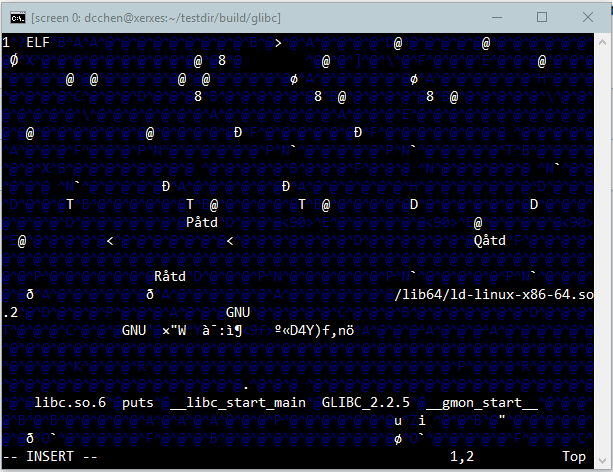
I also added an improper code into the hello3 program by putting a 1 at the very beginning of the program as seen here:

Error-adding

I re-ran the compiler using the command:

./testrun.sh /home/dcchen/testdir/lab2/hello3

This was the result:

Running-glibc

I can conclude that the package works as it was running from my testing build directory.

Installing Free Software Package – Perl

I will be using this website: http://mirror.fsf.org/dragora/current/sources/perl-5.28.0.tar.gz to get the software.

Unzip the tarball file with: tar xvf perl-5.28.0.tar.gz

Change your directory to the perl-5.28.0

Open and read the INSTALL file:

sh Configure -de
make
make test
make install

Open and read the README file:

./Configure -des -Dprefix=$HOME/localperl
make test
make install

Using the example from the README file I will make a new directory for my testing.

./Configure -des -Dprefix=$HOME/testlocalperl

The configuration takes a while (about 3-5 minutes)

Now to setup the package.

command: make

The make command takes a while (about 8-10 minutes)

Now to do a test of the package.

command: make test

The make test command takes a while (about 9-12 minutes)

The result message for me:

Elapsed 1144 sec.
u=12.84 s=4.08 cu=843.10 cs=71.87 scripts=2465 tests=1158632

Comment: All of the instructions were in the README and INSTALL files. It was really straight-forward to perform.

Mozilla Thunderbird Community Involvement

The process can be found here:(https://wiki.mozilla.org/Thunderbird:Bug_Triage)

All bugs are checked through the Mozilla Bugzilla.
Must have an account with privileges at:
(https://bugzilla.mozilla.org/userprefs.cgi?tab=permissions)
The account must contribute to the community for bug fix discussion and to help identify bugs that are not yet found.

The process of contributing to the bug fixes community is described on:(https://wiki.mozilla.org/Thunderbird:Bug_Triage#Canconfirm_and_Editbugs_Privileges)
-Have a list of bugs (3 to 6) that are the best bug reports and best comments that you have done and email it to:(vseerror@lehigh.edu) or contact someone on the IRC with the tag:#maildev.

The links to the IRC can be found here:(https://wiki.mozilla.org/Thunderbird:Bugdays#Where)
–A Web Service called (free mibbit)
(http://www.mibbit.com/chat/?server=irc.mozilla.org&channel=%23tb-qa)
–A plugin for Mozilla Firefox (Chatzilla)
(https://addons.mozilla.org/en-US/firefox/addon/chatzilla/)
–A Client Application for your Operating System
-Windows:(http://www.ircreviews.org/clients/platforms-windows.html)
-MacOS:(http://www.ircreviews.org/clients/platforms-macos.html)
-Linux:(http://www.ircreviews.org/clients/platforms-unix.html)

You can then gain privileges when you have a demonstration of the bug and how it can be fix.

You can then use the privileges to check and test bugs that are still unsolved on the Bugzilla website.

The testing of bugs are handles by you, the user, and the basic instructions are listed on the site under How: (https://wiki.mozilla.org/Thunderbird:Bugdays#Where)

1 – Get a Bugzilla account (https://bugzilla.mozilla.org/createaccount.cgi)
2 – Backup your data – During bug test and the bug will cause data lost.
3 – Make a test environment(optional) – a separate machine or a test account as describe here:(http://kb.mozillazine.org/Testing_pre-release_versions)
(http://kb.mozillazine.org/Starting_Firefox_or_Thunderbird_with_a_specified_profile)
4 – Get a build – This is from the version of Thunderbird you are to use/fix. Either use a current build(Trunk/Daily), “Earlybird”, Beta build or the last officially released version build.
5 – Pick a bug – The suggested bug to fix by the community from here: (https://wiki.mozilla.org/Thunderbird:Upcoming_QA_Testday)
6 – Work bugs – Test the bug. Have well-documented procedures and ease of use instructions to implement that bug fix.


Bug Fixes List can be found here:(https://www.mozilla.org/en-US/security/known-vulnerabilities/thunderbird/#thunderbird52.8)

I will be using an example from:(https://www.mozilla.org/en-US/security/advisories/mfsa2018-19/#CVE-2018-12359)

#CVE-2018-12359:Buffer overflow using computed size

The details of the bug are behind a Bugzilla Account, which I currently do not have.(https://bugzilla.mozilla.org/show_bug.cgi?id=1459162)
Majority of the bug details are hidden behind a Bugzilla account to prevent unauthorized users and/ or malicious users gaining exploits to Thunderbird. Currently I did not make a Bugzilla account as it requires a fairly complex password to be accepted by the password complexity algorithm.

Example Bug:
https://bugzilla.mozilla.org/show_bug.cgi?id=1472494

There were four people involved with this bug fix:

1 – Reporter (The first person to report/ find the bug)

1 – Assignee (Someone from the community with bug testing and patch approving permissions)

2 – Commenters

Reported in June 2018; Resolved July 2018

Bug for Thunderbird 63.0

Bug:

A new tab is opened in Thunderbird 63.0 and causes errors in the debug mode. Apparently the tab opened is not a “new” tab and is using a previous tab’s connection as the new tab.

Explanation:

Basically means the new connections are not able to start the discovery process of “new” emails or attachments and will first have to open previously opened tabs and then disconnect to establish the “new” connections.

Comment:

The bug will generate excess traffic over a network and strain the network by use of repeated data. This is bad because some users may have limited bandwidth or data capacity and this excess data will cost users more money.


Apache (HTTPD) Server Patch Process and Example

The process used to be submitted through the developer’s mailing list and a bug database.
The process is now automated through the bug database Bugzilla:
(http://bz.apache.org/bugzilla/)

The basic requirements for Bugzilla:
(Process is from: https://httpd.apache.org/dev/patches.html)
-Must have a Bugzilla account; Process found here:

https://bz.apache.org/bugzilla/createaccount.cgi
-Fill in a bug report
-Must specify APR(if the patch is for srclib/apr or srclib/apr-util)
-Carefully explain the process of reproducing the bug and how the patch has been tested
-Edit the bug report to have a “PatchAvailable” keyword with a patch attached as the final step

If the patch is ignored:
-Be persist but polite
-Get other Apache users to review the patch
-Make the patch easy to read and apply
-Research if there are any current or similar patches already being discussed in the community
-Help with other bugs to gain recognition in the community

This is a small community as stated by Apache.

An example is from (https://httpd.apache.org/security/vulnerabilities_24.html)

mod_md, DoS via Coredumps on specially crafted requests (CVE-2018-8011)
-Reported on 29 Jun 2018
-Update Released on 15 Jul 2018

Additional Detail:
(http://cve.mitre.org/cgi-bin/cvename.cgi?name=CVE-2018-8011)
(https://www.securitytracker.com/id/1041401)

Basically the exploit can cause the child process to crash from the remote user.

The process seems relatively fast (About half a month). First the process has to be found by a community user and reported (In this case it was through: https://www.securitytracker.com/id/1041401). The patch is tested through Bugzilla and sent to be released.

The process to patching seems straightforward but will not be fast if I were to start as a newcomer of the community.